
Use Animal Support & Updates to ask us a husbandry question or share how your animal is doing. Choose the path that matches what you need.
The numbers on the screenshots match the steps below. Tap or click a screenshot to enlarge it. On a phone, the same fields may stack vertically.
In this guide
Ask for help · Add care details · Send your question · Send an update · After sending
Ask for help
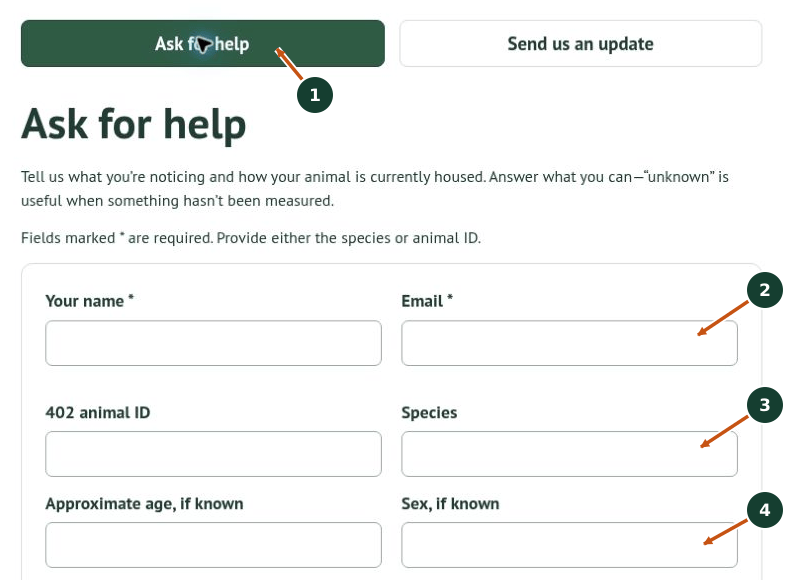
1. Choose Ask for help at the top of the page for a care question or concern.
2. Enter Your name and Email. Both are required. Check the email address carefully so we can contact you.
3. Provide either the 402 animal ID or Species; you may provide both. Use the ID from the animal’s label when available. Do not invent an ID if you cannot find it.
4. Add Approximate age and Sex if known. Keep uncertain information clearly marked as unknown or approximate.
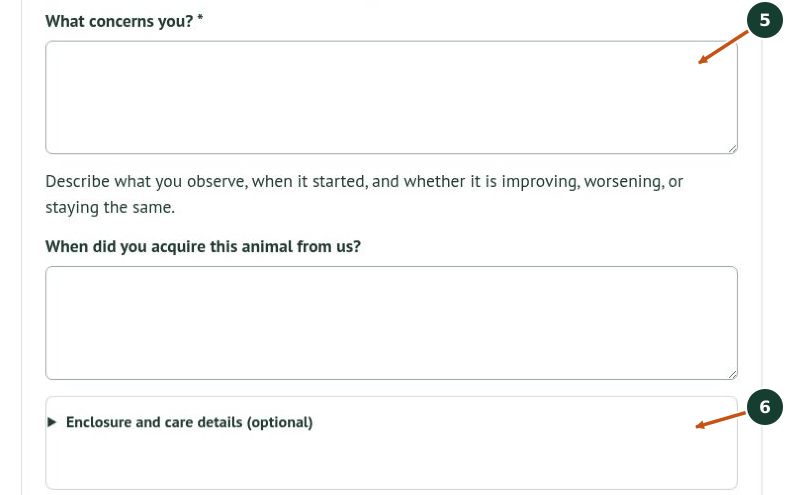
5. In What concerns you?, describe what you observe, when it started, and whether it is improving, worsening, or staying the same. This field is required. Add when you acquired the animal from us in the field below; an approximate date and purchase context are useful if you do not remember the exact date.
6. Select Enclosure and care details (optional) to expand the care fields. Answer what you can. Write “unknown” when you have not measured something rather than guessing.
Add details that help us understand the situation
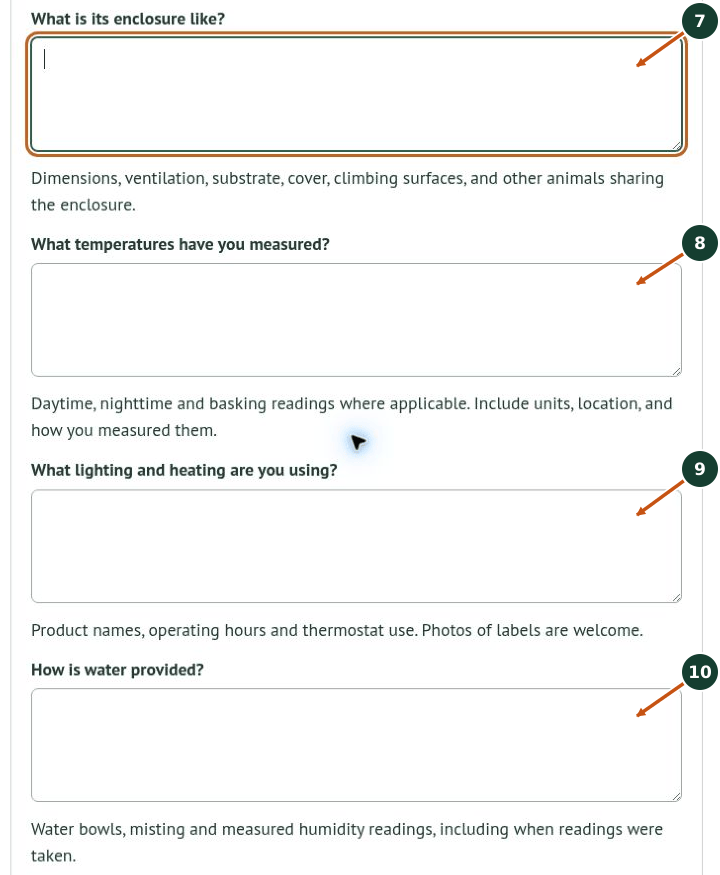
7. Describe the enclosure: dimensions, ventilation, substrate, cover, climbing surfaces, and any animals sharing it. Include units with dimensions.
8. List measured temperatures: daytime, nighttime, and basking readings where applicable. Include units, measurement location, and how you measured them.
9. Describe lighting and heating: product names, operating hours, and thermostat use. An equipment-label photo can help identify the product.
10. Explain water provision, including bowls or misting. Include measured humidity readings and when you took them, if available.

11. Describe feeding: exact foods or formulas, preparation, supplements, frequency, and evidence that the animal is eating.
12. Record recent changes and what you have tried. Include relevant moves, enclosure or food changes, handling, shedding, droppings, activity, or nearby animals, and what happened afterward.
13. Add dated weights or relevant veterinary information you already have. Include units with weights. Leave unrelated personal information out of the message and photographs.
Add photos and send your question
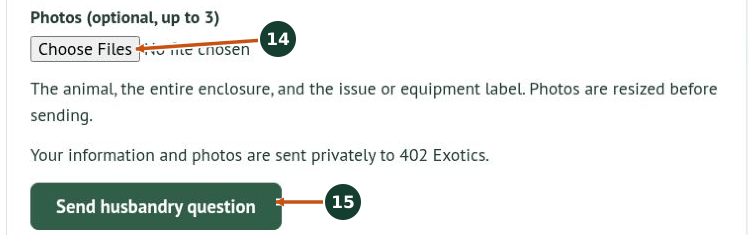
14. Use Choose Files under Photos to attach up to three photos. Useful views include the animal, the entire enclosure, and the concern or equipment label. The form resizes photos before sending. Photos are optional.
15. Review your name, email, animal identification, and question, then choose Send husbandry question. Your information and photos are sent privately to 402 Exotics. Wait for the form’s result before leaving the page.
Send us an update
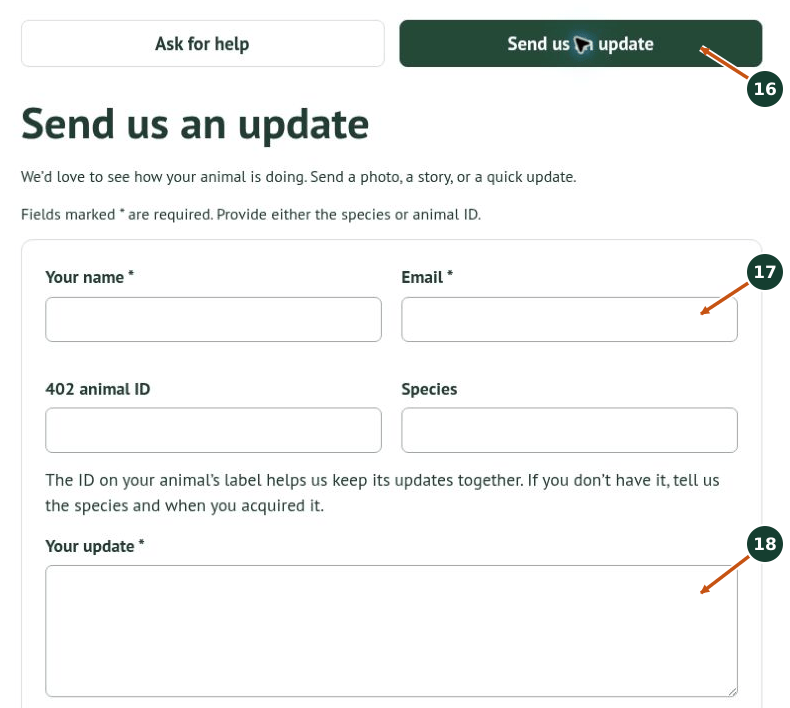
16. Choose Send us an update at the top of the page to share a story, photo, or progress update.
17. Enter your required name and email, plus either the animal ID or species. The ID helps us keep updates together. If you do not have it, tell us the species and when you acquired the animal.
18. Write Your update, which is required. Tell us what has changed or what you would like to share. Include dates and units with growth or weight information, and add acquisition timing in the field below.
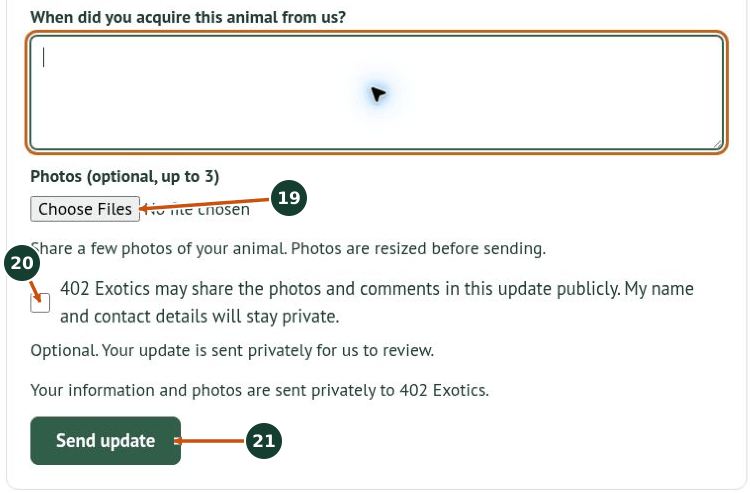
19. Optionally attach up to three photos using Choose Files. Photos are resized before sending.
20. Decide whether to check the optional public-sharing permission box. Checking it allows 402 Exotics to share the photos and comments in this update publicly; your name and contact details stay private. Leave it unchecked if you do not want to give that permission. You can still send an update without checking it.
21. Review the message, attachments, email address, and sharing choice. Select Send update and wait for the form’s result. An update is sent privately for our review; sharing permission does not mean it is automatically published.
After sending
Read the message shown by the form. If it identifies a missing field or an upload problem, correct that issue and try again. Do not assume a submission succeeded if an error appears or the result is unclear.
Keep a copy of your question or update until you know it was received. Check the email address you supplied for a response. If you need to follow up, include the same animal ID or species and the date of your earlier message so we can connect the information.
If the form will not send, use our Contact Hub and describe the error. Avoid repeatedly sending the same message when you are unsure of the result.