
Our mixing calculator scales a known label rate, parts ratio, volume percentage, stock dilution, or recipe. Choose the mode that matches the information you have. The generic examples teach the arithmetic; they are not instructions for using a particular product.
Open our Dilution & Mixing Calculator
Follow the numbered steps in each section. Numbers on screenshots match the steps directly below them. Example values are for learning; replace them with your own information.
In this guide
Scale a product-label rate · Use a product-plus-diluent parts ratio · Calculate a percentage by volume · Dilute a known stock concentration · Scale an existing recipe · Estimate cost, save a recipe, and print
1. Scale a product-label rate
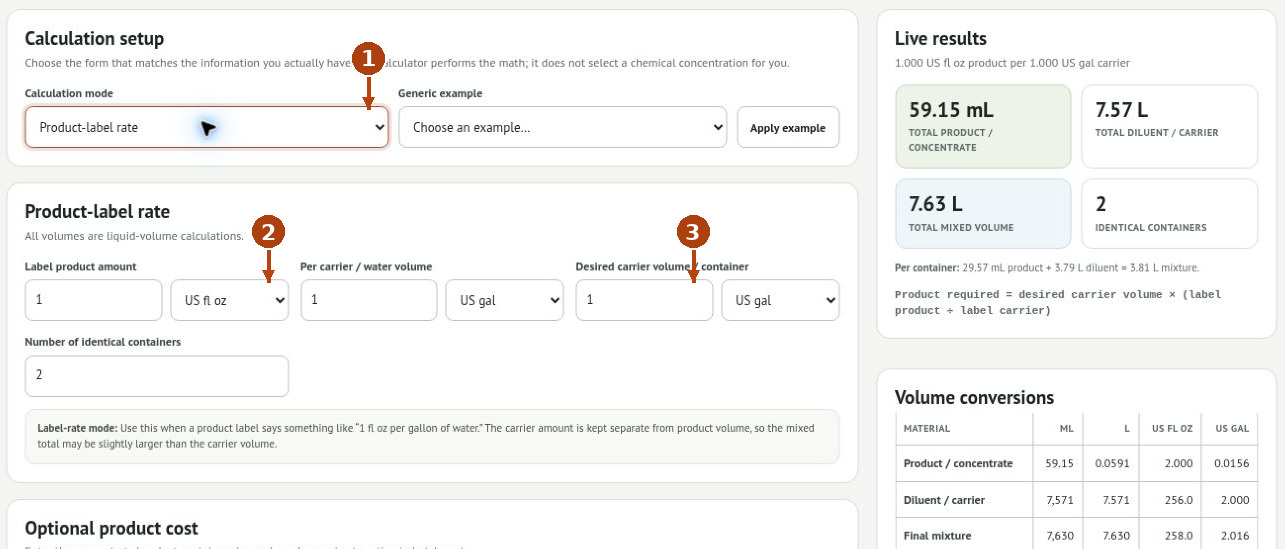
1. Select Product-label rate in Calculation mode. This is for an amount of product per stated carrier or water volume.
2. Enter Label product amount and its liquid unit, then Per carrier / water volume and its unit. Copy the basis from the actual label.
3. Enter Desired carrier volume / container and Number of identical containers. Read both the combined and per-container results.
Worked example: 1 US fl oz product per 1 US gal water, with 1 US gal carrier per container and two containers. Each needs 29.57 mL product plus 1 gallon water. Together they use 59.15 mL product, 7.57 L carrier, and approximately 7.63 L total mixture. The final volume is larger than the water volume.
2. Use a product-plus-diluent parts ratio
1. Select Parts ratio and enter Product / concentrate parts.
2. Enter Diluent / water parts separately. One part product plus ten parts water is eleven total parts.
3. Enter Desired final mixture / container and the number of containers. This mode uses final mixture volume, unlike label-rate mode.
For 1 + 10 parts, product is 1/11 of the final mixture and diluent is 10/11. Avoid interpreting an unexplained “1:10” notation on your own; establish whether the original instructions mean product-to-water or product-to-total.
3. Calculate a percentage by volume
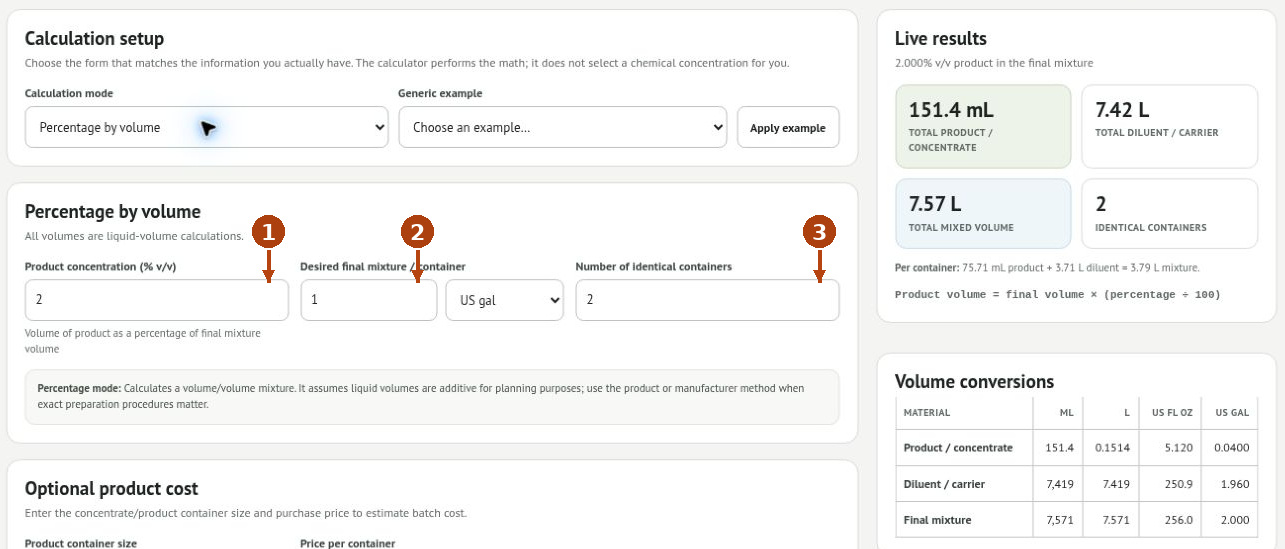
1. Select Percentage by volume and enter the supported Product concentration (% v/v).
2. Enter the desired final mixture volume and its unit.
3. Set the container count and review the totals. For 2% v/v, product is 2% of the final volume and the remaining planned volume is diluent.
This is a volume/volume calculation. It does not turn a weight percentage into a volume percentage. The calculator assumes additive liquid volumes for planning; follow the product’s preparation method when exact preparation matters.
4. Dilute a known stock concentration
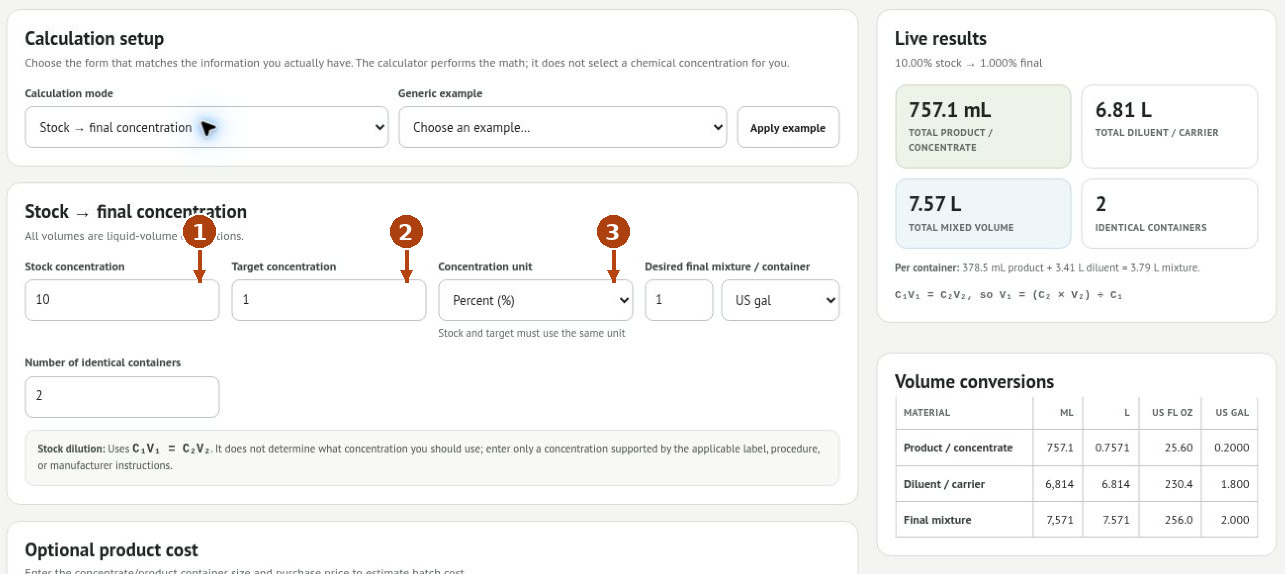
1. Select Stock → final concentration. Enter the known Stock concentration.
2. Enter the supported Target concentration, then the desired final volume and container count.
3. Use the same Concentration unit for stock and target: Percent or ppm. Review the stock amount and diluent amount.
The calculation uses C₁V₁ = C₂V₂. A 10% stock diluted to 1% requires stock equal to one tenth of the final volume. A stronger target cannot be made by adding diluent to a weaker stock. The calculator does not choose the correct target for the product or application.
5. Scale an existing recipe
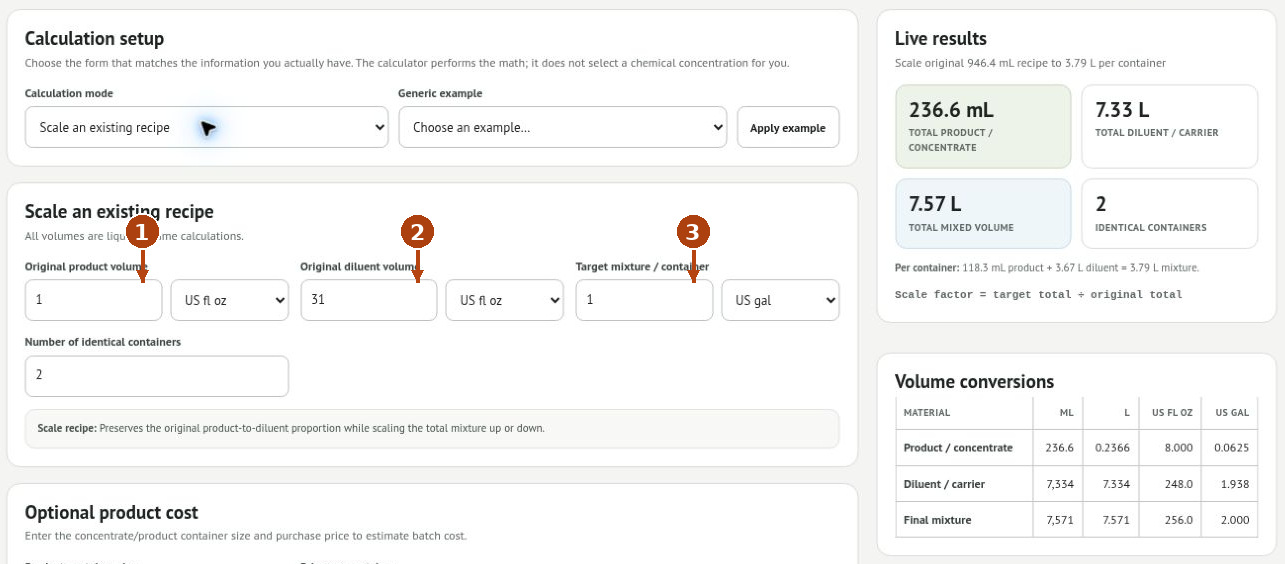
1. Select Scale an existing recipe and enter the original product volume with its unit.
2. Enter the original diluent volume with its unit.
3. Enter Target mixture / container and the number of containers. The original product-to-diluent proportion is preserved.
For an original recipe of 1 US fl oz product plus 31 US fl oz diluent, scaling to one US gallon multiplies both quantities by four: 4 fl oz product and 124 fl oz diluent. For two containers, double those amounts. This remains an arithmetic example.
6. Estimate cost, save a recipe, and print
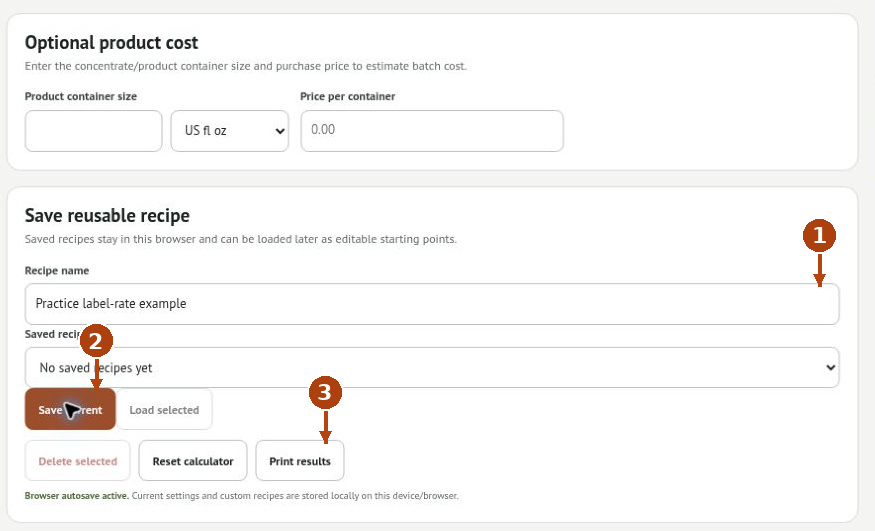
1. Under Optional product cost, enter product-container volume, its liquid unit, and purchase price. Name the setup in Recipe name.
2. Click Save current. To reuse it, select it in Saved recipes and click Load selected, then recheck the inputs.
3. Click Print results for a print/PDF copy. Delete selected removes a saved recipe; Reset calculator returns the calculator to its starting setup.
Current settings and saved recipes are local to this device/browser. Cost estimates cover the entered product consumption; they do not automatically include water, containers, labor, or other expenses. Generic example plus Apply example provides a practice setup, not a chemical recommendation.
Troubleshooting
The mixed volume exceeds the chosen volume
In Product-label rate mode you chose carrier volume; product is added to it. Choose a final-volume mode only when it matches the actual instructions.
The result is off by a large factor
Check every unit and the number of containers. Fluid ounces are liquid volume, not ounces by weight.
Stock and target use different units
Convert them to the same concentration basis before entry. Do not mix a percent number with a ppm number.
The arithmetic is valid but the use is uncertain
Follow the product label and SDS for suitability, preparation, contact time, and handling. Do not mix incompatible products. This tool is not for medication dosing.